I review for BookLook Bloggers

Thursday, January 8, 2026

ESET Protect Advanced

🚨 Don't let cyber threats ruin your day! Protect your computer with ESET PROTECT ADVANCED. 🛡️

With advanced protection against viruses, malware, and ransomware, you can have peace of mind knowing your device is safe. 🚫 Say goodbye to slowdowns and disruptions, and hello to smooth and secure computing. 💰 Plus, with affordable pricing and award-winning support, ESET PROTECT ADVANCED is the smart choice for protecting your business

Try ESET PROTECT ADVANCED today! ➡️ https://bit.ly/3G0rVtR

Wednesday, January 7, 2026

ESET Protect 3

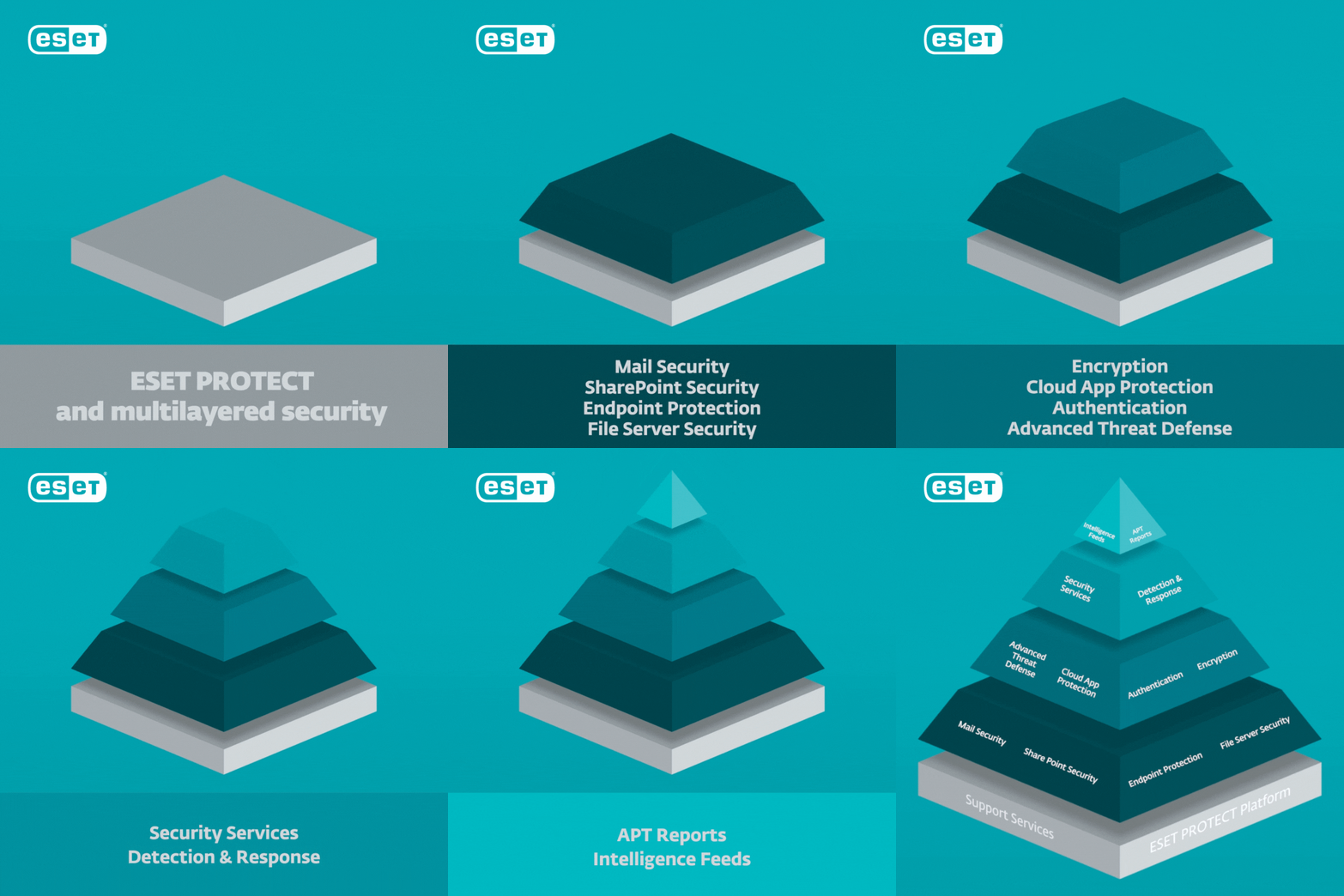
🔒 Protect your devices with the ultimate defense of ESET PROTECT COMPLETE! 🔒

Our multilayered security system keeps your data safe from all angles, including antivirus, firewall, anti-phishing, and more. 🔍 Rest easy knowing our advanced technology is constantly scanning for threats and proactively blocking them.
💻 Stay protected on all your devices - Windows, Mac, Android, and more.
Get the peace of mind you deserve with ESET PROTECT COMPLETE. ➡️ https://bit.ly/3G0rVtR

Tuesday, January 6, 2026

ESET PROTECT Complete 1

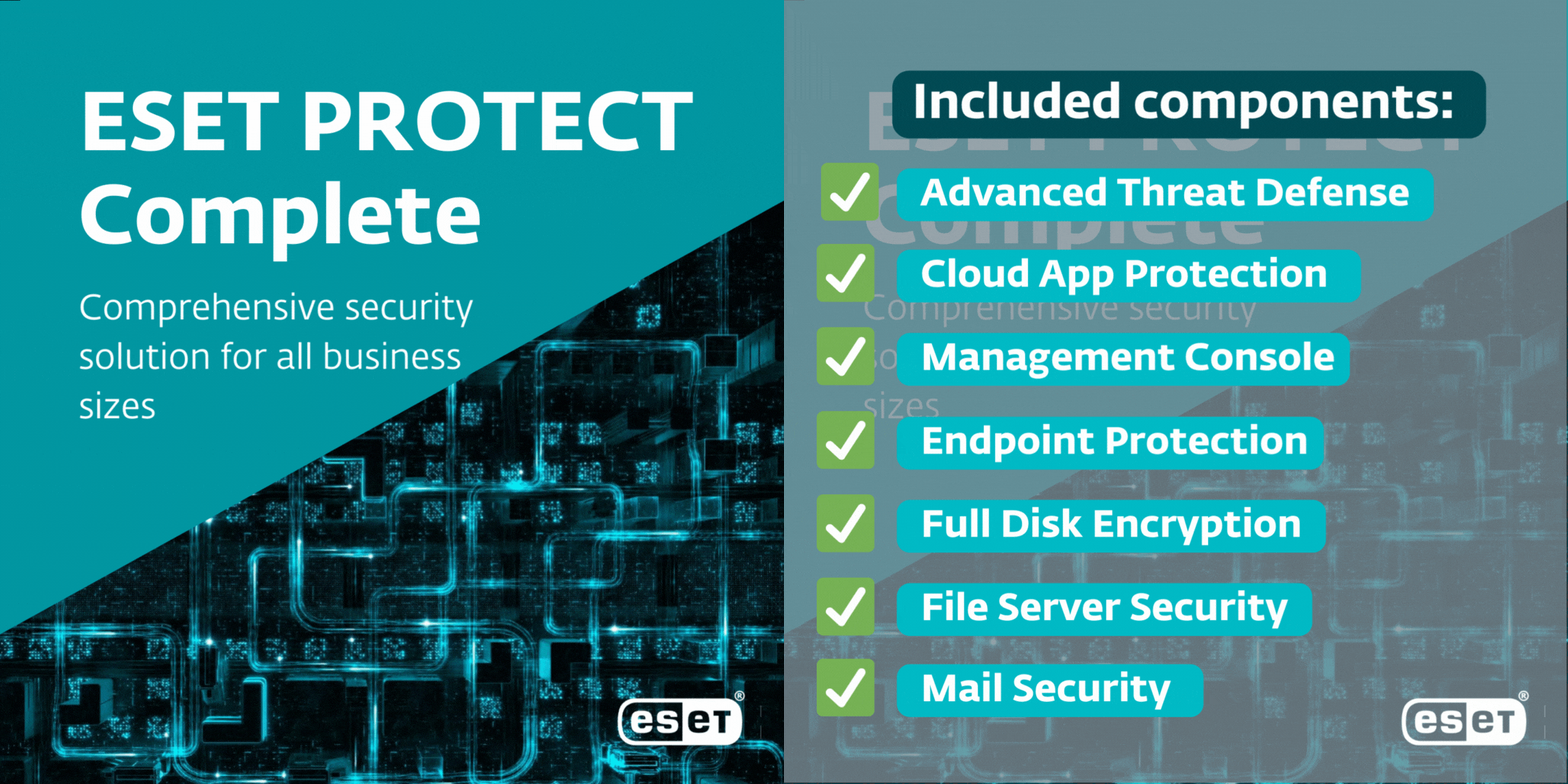
Are you tired of constantly worrying about cyber threats to your business? Look no further than ESET PROTECT Complete!

❌ Say goodbye to malware and ransomware attacks
✅ Say hello to top-notch security and peace of mind

With ESET PROTECT Complete, you can rest easy knowing that your business is protected against a wide range of online threats. ESET’s comprehensive security solution includes antivirus, firewall, and web protection to keep your company's data safe and secure.

Don't take any chances with your business's security. Try it out today! ➡️ https://bit.ly/3G0rVtR

Thursday, October 3, 2024

Tuesday, February 14, 2023

Allow users to create App Passwords in Office 365 | Multi-factor Authentication.

If you are an Admin User who wish to create App Passwords so that you can use them in your code/web applications so that you don’t have to store credentials in your application? Example: Azure Function you are developing shouldn’t store the password of the User.

At times, you must’ve noticed that why you can’t create App Passwords even when you are having MFA enabled for yourself!

Here’s why –

Scenario

Let’s say the users are logged in and they go to their Office 365 Account where they can add multiple Authentication Methods. Shortcut for that is https://mysignins.microsoft.com/security-info

  1. Once they are in Security Info in order to add new method of Authentication as below
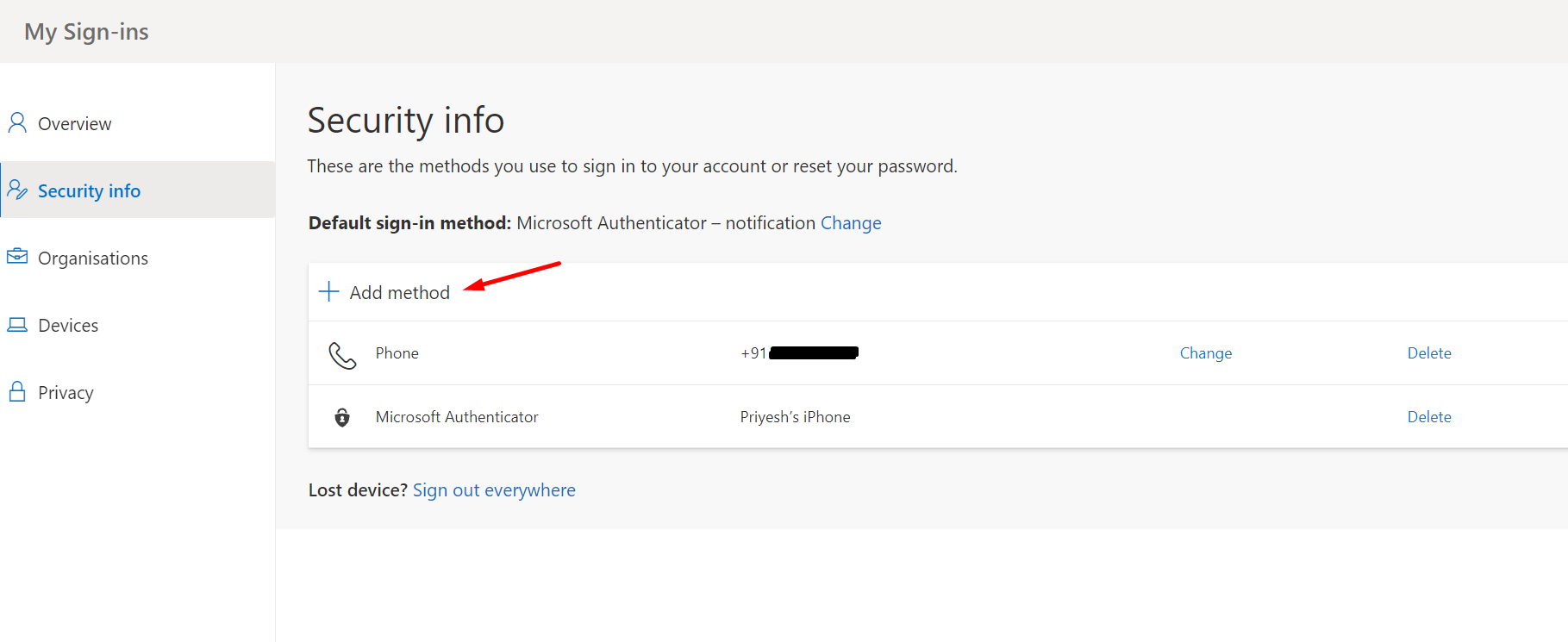
  2. And they don’t get to create an App Password by default.
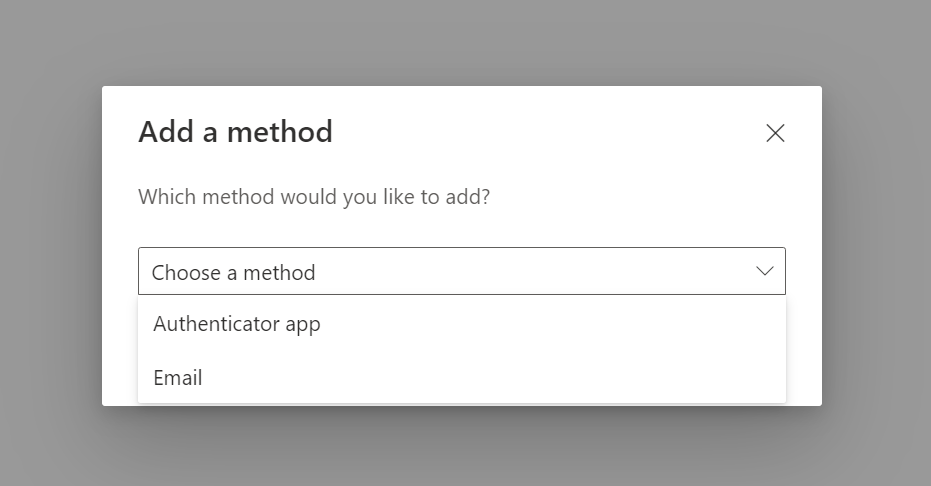

    Let’s enable users to be able to create their own App Passwords from Azure Portal.

Enforce Users to use MFA

Let’s say the Conditional Access above is already set. Now, you need to enforce users to use MFA.

  1. In O365, go to the User in Active User whom you want to allow creation of Azure App Passwords.

    Select the user and click on Multi-factor Authentication.

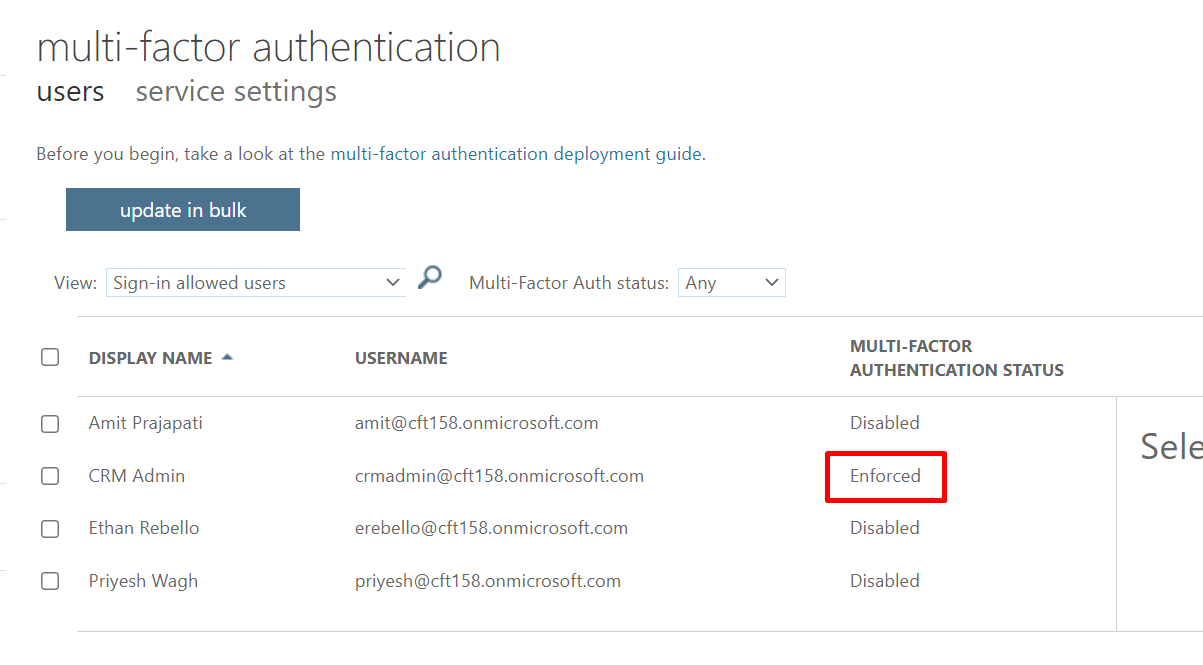
  2. Now, in the multi-factor authentication page, you’ll see the users as whether they are using MFA or not.
    As you see below, CRM Admin is Enabled for Multi-Factor Authentication, but not Enforced.

    So, you have to click on Enforce button to enforce the MFA.

    But sometimes you don't see enforce option event though default security option enabled on conditional policy in Azure which means user never configure MFA though it's enabled for user. So, you need to configure the MFA first and then comeback and enable enforce and then you will be able to see the app password option in user's security info under personal setting.

MFA Status

        Disabled: User does not have MFA enabled and is not required to register for MFA

        Enabled

                    User has MFA enabled but have not registered. Meaning if the user has had MFA enabled for                        14 days or more, they will be required to register on next login. They will only be                                            prompted/required to         register is they login through the web, or setup a new device.

                    I've had a user Enabled for a year, they worked fine that whole year using Outlook on their                            computer and phone, as well as Teams. They got a new phone and went to setup Teams on it, at                     that point they needed to sign in, which required the MFA registration to be completed.

                    The other issue with this status, is that if an attacker gets their 365 credentials and goes to    n                        login, the attacker will be prompted to register MFA and can use their own device and info,                             bypassing MFA. There are two ways we know to avoid this. One option is running a PowerShell                      command to logout all sessions, forcing them to sign back in and register MFA. This command                      can be ran against the entire organization, or per user. The other option is using a condition                           access policy to flat out block access to a user or group of users, we have a writeup on that                            here Block Access | Any Location | Excluding "MFA Trusted IPs , this option requires at least one                      AzureAD Premium P1 license.

        Enforced: User has registered for MFA.

                      Enabled via Conditional Access: This status will only appear in the Excel report and shows that                       the user status is "Enabled" through Security Defaults. To confirm an "Enforced" status in this                          scenario. Check the report columns for "Activation" and "DefaultMFAMethod", the Activation                          should show "Yes" for Enforced/Registered.

          All users start out Disabled. When you enroll users in per-user Azure AD Multi-Factor Authentication,             their state changes to Enabled. When enabled users sign in and complete the registration process,                 their state changes to Enforced. Administrators may move users between states, including from                      Enforced to Enabled or Disabled.    


  1. Now, when you click on Enforce, you’ll see the below message.


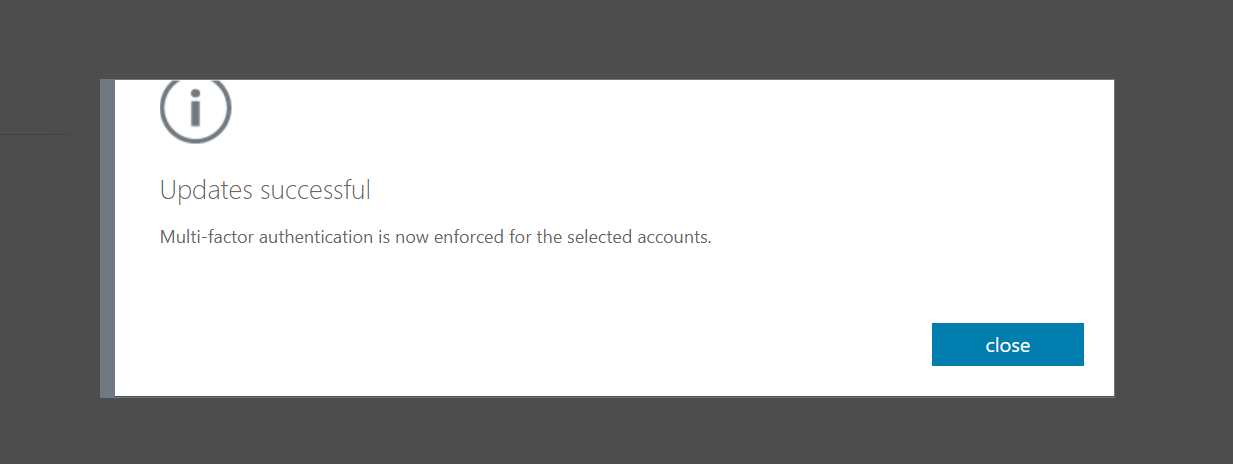
  2. After enforcing, you’ll get a success message as below.

  3. Once enforced, you’ll see the below status is updated on whoever this is enforced on.


Create App Passwords from My Sign-ins page

Now that we have enforced the User to use MFA, here’s how you can create App Passwords

  1. As shown in the beginning, try to Add a new method


  2. This time, you’ll be able to see App Passwords as an option to select. Select it and click on Add
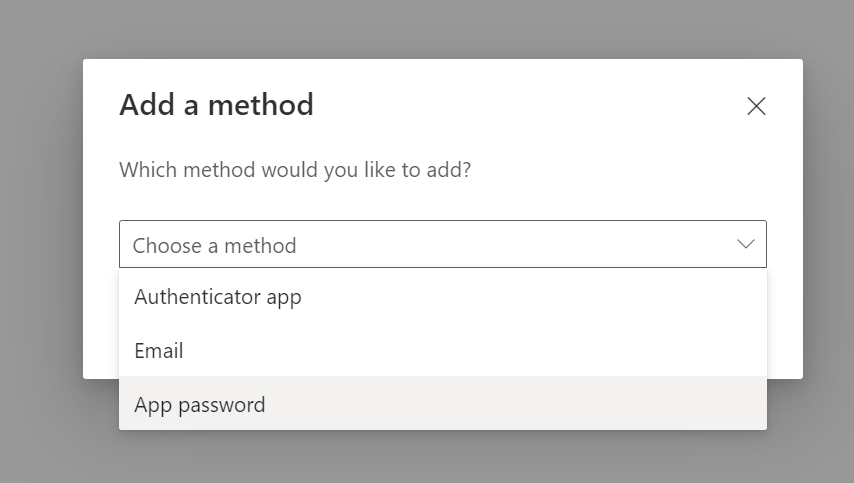


  3. Next, you can give a name to the App Password you are setting. You can give it a suitable name keeping in mind the purpose of the App Password you are creating.


    I’ll just give a sample name here since I want to use it in Azure Functions which I’m working on.
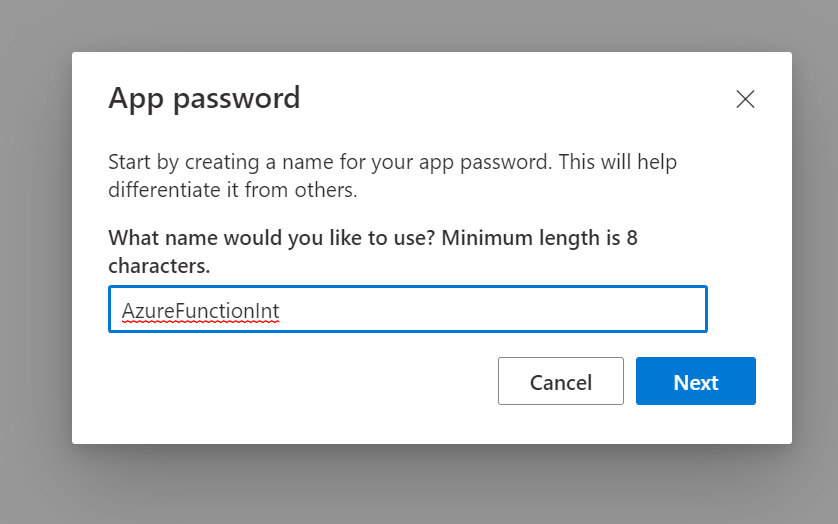

  4. And once it is created in a few moments, make sure you copy it before clicking on Done. Else, you can’t retrieve this later and it will be created without you noting it down.


  5. And it’ll be listed among other authentications methods.
REPORT THIS AD

Additionally, it is recommended to also review setting up Conditional Access policies too while setting up Azure AD Multi-Factor Authentication – https://docs.microsoft.com/en-us/azure/active-directory/authentication/tutorial-enable-azure-mfa?WT.mc_id=DX-MVP-5003911


Saturday, January 7, 2023

We are here to help you. Contact Aspire iTECH Solutions

The rise of #ransomware has led to many businesses to seeking out cybersecurity insurance. Get a crash course on this trending topic from our preferred vendor, ESET! https://esetpartners.amp.vg/xl/dc00sfefu0r1i

Friday, January 6, 2023

Cybersecurity insurance and endpoint detection and response

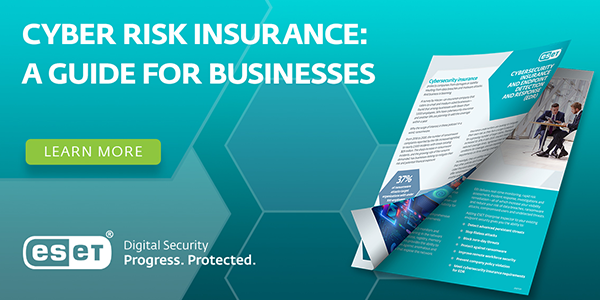
Considering cyber risk insurance? Many insurance companies now require an EDR solution to be covered. Learn about this and more in ESET's latest guide: https://esetpartners-content.amp.vg/web/cl82op0kmnd0d

Thursday, January 5, 2023

Cybersecurity insurance and endpoint detection and response

ESET's newest guide on cyber risk insurance will walk you through the different types of policies and coverage available to businesses. Get it here: https://esetpartners-content.amp.vg/web/b77oc0b15g687

Wednesday, January 4, 2023

Cybersecurity insurance and endpoint detection and response

Not all cyber risk insurance policies are created equal. Luckily, our preferred vendor ESET wrote up a helpful guide so your org can make an informed purchase: https://esetpartners-content.amp.vg/web/b70al129ysuyz

Tuesday, January 3, 2023

Cybersecurity insurance and endpoint detection and response

Purchasing insurance is never fun but we all know it's worth it when things go south. Our friends at ESET wrote up a handy guide to walk you through everything to consider when purchasing cybersecurity insurance for your business: https://esetpartners-content.amp.vg/web/coxifn5ck6x3p

Wednesday, December 21, 2022

CLA amplifies family culture and client support with Microsoft 365 tools

CliftonLarsonAllen (CLA) is a professional services firm with 120 locations across the United States. Their mission to elevate members as they help build careers inspired them to select Microsoft 365 to jump-start their organization’s digital transformation. After COVID-19 restrictions sent everyone home to work remotely, members immediately started using Teams to continue engaging with learning solutions and driving the organization’s competitive advantage through a close-knit culture. Using Microsoft Defender for Endpoint also helped them protect the organization. And, they're expanding their use of Dynamics 365 to map their clients’ journeys, using data to generate insights.

Read More...

Tuesday, December 20, 2022

Enabling teams to do their best work ​with cloud technology

Every customer is in a different place in their hybrid work journey. Whatever unique hybrid work pain points have been identified, Microsoft Modern Work solutions can help. With an end-to-end, integrated portfolio of cloud solutions across Microsoft 365, Dynamics 365, and Azure, Modern Work solutions are built on a foundation of security and privacy to help every organization in every industry build resilience and improve the bottom line. To thrive in this new hybrid world, people and organizations need solutions that are fluid, dynamic, and cloud-powered. With 73% of employees saying they want flexible remote work options to stay, leaders need to pay attention. Sign up and stay connected. We can help secure your journey ​to the cloud.

Read More...

Thursday, December 15, 2022

How To Transition In An Increasingly Populated Cloud

When the entire economy was disrupted by COVID and operations migrated online, one of the primary elements that kept enterprises viable was cloud migration. It's no surprise that businesses are fast adjusting to this multibillion-dollar market, especially in the aftermath of the epidemic. Because of the enhanced capabilities and benefits provided by the cloud, businesses are increasingly reconsidering every operation in favor of it. Virtually any company of any size can quickly transition to the cloud with the right provider, enhancing productivity, availability, and saving money on operations. Read the Forbes article to learn what leaders are doing to join the craze that has been dubbed the new normal.

Read More...

Tuesday, December 13, 2022

Transition to Cloud with Microsoft 365

Be more productive from anywhere, secure your business with technology you can trust, and get one cost-effective solution for secure collaboration. Microsoft 365 is uniquely positioned to help you build more resilience, streamline IT operations, consolidate vendors, and enable higher employee productivity. Check out an infographic illustrating how to empower users with devices designed to meet the ways you work. Learn about cost savings and benefits of Microsoft 365 +Surface. Examples are: -Flexible, premium devices designed to maximize productivity and collaborative experiences -Zero-touch deployment and unified management drive down costs and complexity for a distributed workforce -Security from chip-to-cloud with a zero-trust security model Sign up to stay connected. We’ll help you become a leader in digital transformation and the future of hybrid work.

Read More...

Thursday, December 8, 2022

Using Microsoft Teams and Power Platform Integration to create collaborative apps

In today’s hybrid world of work, people have a multitude of collaboration tools and apps that they can use to get work done. There’s an opportunity for organizations to create purposeful collaborative platforms that can integrate various apps and provide people with a new way to work without switching between applications and processes. In this Microsoft-produced e-book, learn about how Microsoft Power Platform’s set of low-code tools for building and deploying complex business solutions also function for analyzing and visualizing data, automating business processes, and interacting with virtual agents. Learn about how Teams and Power Platform integrate various capabilities for developers, as well as how it simplifies and increases developer productivity. Sign up to stay connected. We’ll help you to improve your business efficiency and gain the competitive edge you need.

Read More...

Wednesday, December 7, 2022

Korean biopharma company enters into the next phase with big tech

Microsoft’s ‘modern workplace’ is a hybrid business model that makes use of cloud-based Microsoft 365 tools and services to create an agile system that can help any company evolve. IT leaders are embracing modern by doing the following: migrating company data and tools to the cloud; moving from classic to modern SharePoint; flattening site architecture and getting rid of subsites; and connecting modern team sites to Microsoft 365 groups and teams. Learn about the top reasons why teams using modern workplace strategies have increased collaboration, contentment, and learning.

Read More...

Tuesday, December 6, 2022

Transition to Cloud with Microsoft Teams

Cloud transformation has become a top priority for industries. A recent survey showed 80% of customers intend to accelerate their digital transformation and 60% indicate security and compliance budgets have gone up to better defend customer’s infrastructures in these remote or hybrid work scenarios. Microsoft Teams is the hub for teamwork that helps drive more effective and secure meetings—and since participants can dial in from anywhere, it extends itself in becoming an inclusive part of the new workspace. This infographic illustrates how Teams enables collaboration with capabilities for chatting, meetings, and files access from any device, from anywhere. Get a link to a 2021 Gartner report and learn how Microsoft was recognized as a leader for meeting solutions. Sign up to stay connected. Microsoft 365 is uniquely positioned to help your organization build more resilience through cloud solutions.

Read More...

Tuesday, November 29, 2022

Be productive from anywhere with industry-leading apps

Companies are under pressure to stay relevant and efficient in the digital business era. Microsoft 365 is uniquely positioned to help organizations of all sizes build resiliency through cloud solutions that enable higher employee productivity and satisfaction—and improve their bottom line by streamlining IT operations and vendor consolidations. Learn about how to keep customers safe through state-of-the art security solutions and the newest applications that make it all possible. Sign up and stay connected. We’ll help you increase your company's momentum by gaining secure access to applications, products, and services from anywhere in the world at any time.

Read More...

Thursday, November 24, 2022

4 reasons remote teams should go all in on Microsoft’s modern workplace

Microsoft’s ‘modern workplace’ is a hybrid business model that makes use of cloud-based Microsoft 365 tools and services to create an agile system that can help any company evolve. IT leaders are embracing modern by doing the following: migrating company data and tools to the cloud; moving from classic to modern SharePoint; flattening site architecture and getting rid of subsites; and connecting modern team sites to Microsoft 365 groups and teams. Learn about the top reasons why teams using modern workplace strategies have increased collaboration, contentment, and learning.

Read More...

Tuesday, November 22, 2022

Major mineral water producer boosts productivity and saves costs by creating reports in the cloud

"IDS Borjomi Ukraine is a leader in the natural mineral water market in Ukraine. As the company is constantly expanding its services, it needed to scale up its server performance. To generate daily reports, the team wanted modern digital tools that would enable faster data processing and scaling on demand. The shift to Azure Synapse Analytics made all that possible. In addition, Power BI integrated data about sales teams’ activities, stock-keeping units, product orders and much more. The cloud solution not only saved time but cost as well. The company has saved more than 30 percent of the budget compared to expanding its on-premises resources and can scale it up whenever needed. "

Read More...